



Quick Account Gateway
Smart login redirects for protected Joomla pages
Create public entry URLs for protected Joomla pages. Guests are automatically redirected to the login page and, after a successful login, sent directly to the intended destination.
Free for one gateway · Pro for multiple gateways and group-based redirects
The right way into your protected areas
Quick Account Gateway connects easy-to-understand public URLs with protected Joomla pages.
Protected menu items such as downloads, support areas or user profiles are not directly accessible to guests. Joomla often displays its default login form or redirects visitors to a generally configured page.
Quick Account Gateway provides a clear public entry point instead. Guests are first redirected to your existing login page. After a successful login, they are automatically sent to the intended protected destination.
Users who are already logged in are redirected directly to the destination without any unnecessary detour.
For a single protected area, the free version is all you need. With Quick Account Gateway Pro, you can manage multiple gateways and redirect users to different destinations depending on their Joomla user group.
A clear login workflow for protected pages
Quick Account Gateway is ideal for Joomla websites where visitors should reach protected areas through clear and public entry URLs.
Customer downloads
Link to a simple URL such as /download and automatically send customers to their downloads after login.
Protected support areas
Guide users through a public entry URL directly to their protected support or ticket system.
User profiles
Create an easy-to-remember public URL for protected profile or account pages.
Member areas
Connect public links with protected pages provided by membership or community components.
Different user groups
With the Pro version, redirect users to different protected destinations depending on their Joomla user group.
Multilingual websites
Language prefixes such as /de/ and /en/ are automatically taken into account.
From a public link directly to the protected destination
Quick Account Gateway automatically handles the login and redirect flow.
You define a public gateway path, your existing login page and the protected destination. Quick Account Gateway then handles the rest of the process.
The user opens a URL such as /download.
Quick Account Gateway detects whether the visitor is already logged in.
Guests are automatically sent to the configured login page.
After a successful login, the appropriate protected destination is loaded automatically.
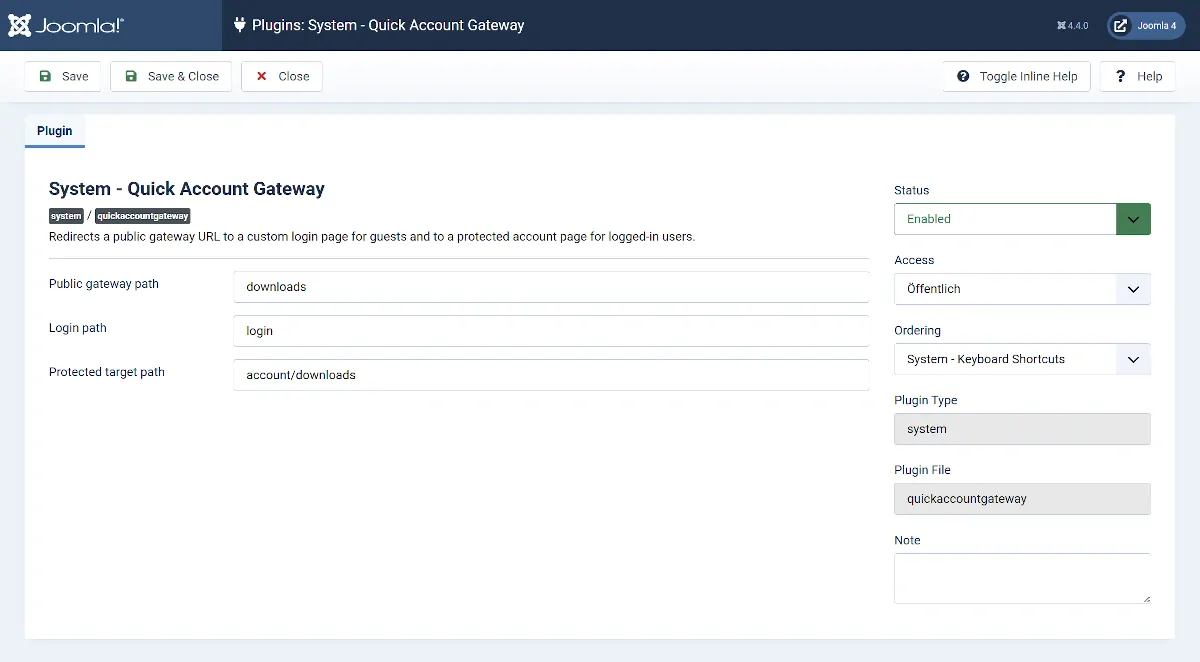
Set up the free version in just a few steps
A simple gateway only requires three paths.
Paths are entered relative to your Joomla website. Full external URLs are not required.
If you only need one public entry point to a protected area, the free version is already fully sufficient.
Everything you need for a reliable login flow
Public gateway paths
Define short public URLs as entry points to protected areas. The Free version supports one gateway, while Pro supports multiple gateways.
Your own login page
Use your existing public Joomla login menu item.
Automatic return
After a successful login, the user is automatically sent to the intended protected destination.
Direct access for logged-in users
Users who are already logged in are redirected directly to the appropriate destination.
Multilingual URLs
Joomla language prefixes are automatically detected and preserved.
Component independent
The plugin works with any protected Joomla menu item or component.
More control for multiple protected areas
When a single gateway is no longer enough, the Pro version extends Quick Account Gateway with flexible rules and different destination pages.
Multiple gateway rules
Create multiple public gateway paths and manage different protected areas centrally within the plugin.
Group-based destinations
Redirect logged-in users to different destinations depending on their Joomla user group.
Fallback destination
Define a general destination for users who do not match a specific group-based rule.
System requirements
Before installing, make sure your website meets the required technical requirements.
Which version is right for your website?
Start for free with one gateway or choose Pro for multiple gateways and group-based redirects.
Ideal if you need one public entry point for a protected area of your Joomla website.
Download for freeIncluded in Free
- One fully configurable gateway
- Public gateway path
- Custom login path
- Custom destination path
- Automatic redirect to login
- Automatic return after successful login
- Direct redirect for logged-in users
- Multilingual Joomla websites
- Joomla 4.4, 5 and 6
For websites with multiple protected areas or different destinations for different user groups.
Buy ProEverything in Free, plus
- Multiple gateway rules
- Multiple public gateway paths
- Individual destinations per gateway
- Group-based destination redirects
- Different destinations for Joomla user groups
- Fallback destination for users without a matching group rule
- Central management of all gateway rules
- Updates for the duration of the subscription
Questions and answers
What is a gateway path used for?
The gateway path is a public URL that you can use, for example, in an email or article. The actual destination remains protected.
What happens when a visitor is not logged in?
The visitor is first redirected to the configured login page. After a successful login, Quick Account Gateway automatically opens the intended protected destination.
What happens if the user is already logged in?
Logged-in users are redirected directly from the gateway to the appropriate protected destination.
Does the plugin work on multilingual websites?
Yes. Language prefixes such as /de/ or /en/ are automatically detected and preserved for the login and destination pages.
Is the plugin tied to OS Membership?
No. Quick Account Gateway works with any protected Joomla page and is not tied to a specific component.
How many gateways does the free version support?
The free version supports one fully configurable gateway. If you need multiple gateway paths, you can use Quick Account Gateway Pro.
What does Quick Account Gateway Pro add?
The Pro version adds multiple gateway rules and allows logged-in users to be redirected to different destinations depending on their Joomla user group. You can also define a fallback destination.
When do I need group-based redirects?
This is useful, for example, when different customer groups, memberships or user roles should reach different protected areas through the same public gateway URL.
Can I upgrade from Free to Pro later?
Yes. You can start with the free version and upgrade to Quick Account Gateway Pro later. Your existing configuration can be retained.
Do I need a separate login menu item?
Yes. The login path should point to a publicly accessible Joomla login page.
Pro Version
- Fixed gateway handling on multilingual Joomla websites
- Fixed virtual gateway URLs when no corresponding menu item exists
Initial release
Free Version
- Fixed gateway handling on multilingual Joomla websites
- Fixed virtual gateway URLs when no corresponding menu item exists
Initial release.
Send users directly to the right destination after login
Use Quick Account Gateway for free with one protected area, or choose Pro if you need multiple gateways and flexible redirect rules.